

Test your knowledge in live multiplayer Jeopardy-style trivia battles with AI-assisted grading that recognizes correct answers even with spelling mistakes.

Car Editor
Visualize paint jobs, rim swaps, wraps, and body kits on your actual car photos using AI-powered photorealistic rendering before committing to costly builds.
About Car Editor
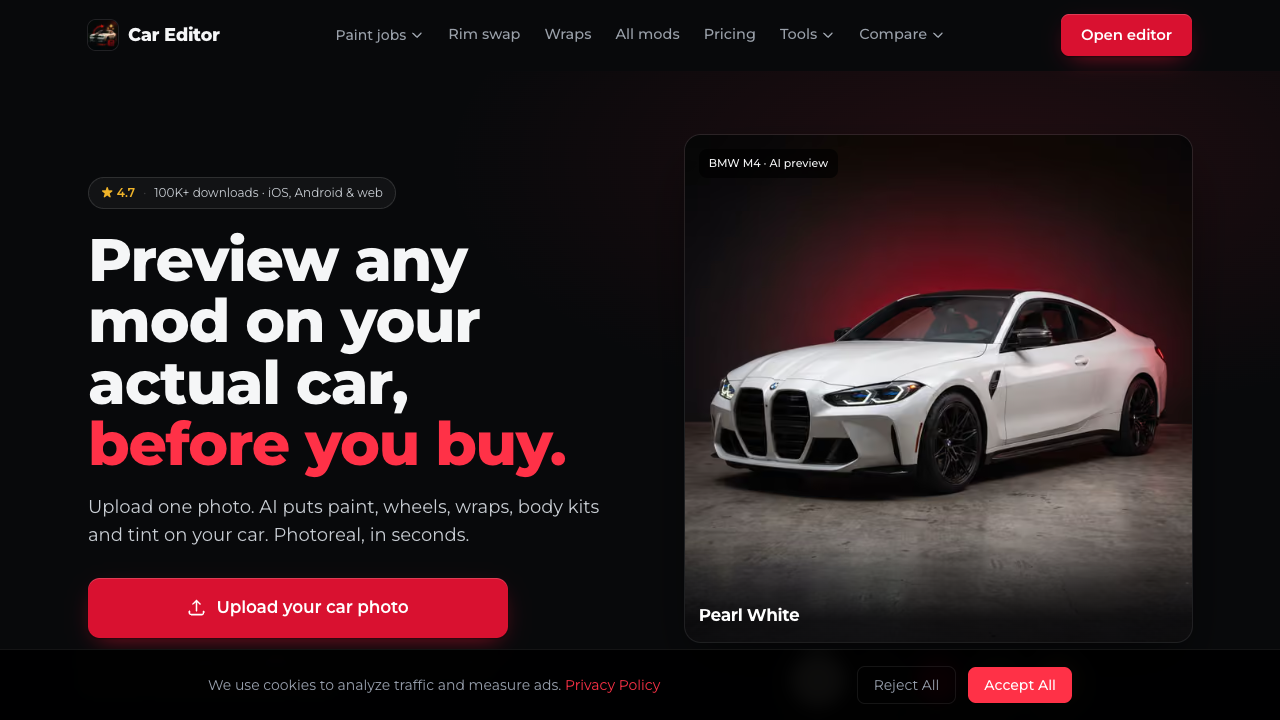
Car Editor is an AI-driven car customization platform available on web browsers, iOS, and Android devices. By allowing users to upload a single photo of their actual vehicle, the tool generates high-resolution, photorealistic previews of various aftermarket modifications. Rather than relying on generic stock templates or 3D CAD models, Car Editor places edits directly into the context of the original photograph, carefully preserving ambient lighting, shadows, and background details for an accurate real-world visual representation. The platform offers an extensive catalog featuring over 119 individual modifications spread across 12 distinct categories. Users can experiment with custom paint jobs, rim swaps, widebody kits, vinyl wraps, window tinting, spoilers, custom headlights, and neon underglow. Every modification type consumes a standard 30 credits per edit, allowing flexibility across different custom build ideas. Additionally, the suite provides 10 full-scene AI styles to alter background environments and includes free utility features such as tire size calculators, VIN decoders, and paint code lookups. Designed for a diverse user base, Car Editor serves individual car enthusiasts planning personal vehicle builds, custom auto body shops, vehicle wrapping professionals, and social media content creators. Professional automotive shops and wrap installers can utilize the commercial rights included in higher-tier subscriptions to deliver high-fidelity visual mockups to clients prior to physical installation, eliminating client uncertainty and speeding up consultation workflows. What sets Car Editor apart from traditional customizer tools is its photo-agnostic AI rendering system that seamlessly adapts modifications to any photo angle, location, or lighting setup—whether taken in a professional studio or an underground parking garage. Combined with native mobile accessibility and instant browser rendering, it offers an efficient way to eliminate costly guesswork before committing to expensive automotive modifications.
Pros & cons
Pros
- Renders photorealistic modifications directly on user-uploaded car photos.
- Maintains original background lighting, shadows, and angle consistency.
- Includes commercial usage rights on monthly and yearly plans.
- Offers native mobile apps for both iOS and Android alongside the web app.
- Provides a 14-day money-back refund policy if renders remain unused.
Cons
- Unused render credits do not roll over into subsequent billing cycles.
- The weekly plan excludes commercial usage rights.
- Annual usage is capped at 360 renders on the yearly subscription plan.
Use cases
- Car enthusiasts can upload photos of their personal vehicles to preview paint, wraps, and widebody kits before paying for physical work.
- Auto wrap and modification shops can generate visual build concepts to pitch custom designs directly to clients with full commercial rights.
- Social media automotive creators can generate high-quality visual content and cinematic build previews for Instagram and TikTok.
Features
- photorealistic ai aftermarket modification rendering
- cross-platform support for web, ios, and android
- 10 full-scene ai background environment styles
- car wrap generator and window tint simulator
- ai widebody kits and custom spoiler previews
- virtual rim swap and wheel styling catalog
- ai paint deck and custom color previewing
- catalog of 119 mods across 12 categories
Pricing
Weekly
$11.99 / week
- 30 renders per week
- 30 credits per edit
- Access to all 119 mods across 12 categories
- 10 full-scene AI styles
- Photoreal HD output
- Saved renders in account
- Personal use only
Monthly
$25.99 / month
- 90 renders per month
- 30 credits per edit
- Access to all 119 mods across 12 categories
- 10 full-scene AI styles
- Photoreal HD output
- Saved renders in account
- Commercial usage rights included
Yearly
$79.99 / year
- 360 renders per year
- 30 credits per edit
- Access to all 119 mods across 12 categories
- 10 full-scene AI styles
- Photoreal HD output
- Saved renders in account
- Commercial usage rights included
FAQs
Can I preview modifications on my own car photo?
Yes, Car Editor is designed to work directly on your uploaded photograph rather than generic templates. The AI maintains your car's specific angle, original lighting conditions, and surrounding background details.
What platforms is Car Editor available on?
Car Editor is accessible directly through web browsers as well as via native mobile applications available for iOS and Android devices.
Are commercial usage rights included with all plans?
Commercial usage rights are included with the Monthly ($25.99/month) and Yearly ($79.99/year) subscription plans. The Weekly plan is limited strictly to personal use.
Do unused render credits roll over to the next billing period?
No, unused render credits do not roll over. Credit allowances refill automatically at the start of each new billing cycle depending on your plan.
Does Car Editor offer a money-back guarantee?
Car Editor provides a 14-day money-back guarantee on subscription purchases, provided that you have not used any of your allocated render credits.
Ratings & reviews
No reviews yet. Be the first to share how Car Editor worked for you.
Sponsored tools

Connect with engaged niche audiences or monetize your subscriber base through an automated marketplace featuring verified metrics and secure Stripe payments.

Monitor brand citations and prompt visibility across Google AI Overviews, ChatGPT, Perplexity, Claude, and Gemini with free 30-day answer engine reports.

Generate cinematic videos with synchronized audio and multi-modal references. Empower creators and marketers to direct consistent characters, action, and sound.

Create 2K AI videos with native stereo audio from text or images. Ideal for creators and marketers seeking rapid, studio-grade visual content production.

Generate marketing videos, AI avatars, and multi-language translations from prompts, images, or product links without any filming or manual editing.

Detect and strip hidden AI Unicode markers and rewrite sentences to eliminate statistical ChatGPT watermarks for writers, students, and content creators.