

Generate high-quality AI images, videos, and music through a single unified API with persistent storage and callback support built for modern developers.

AI Art Create
Generate images and videos across top AI models like Flux, Kling, and Veo using a single prompt box and shared credit balance for creators and marketers.
About AI Art Create
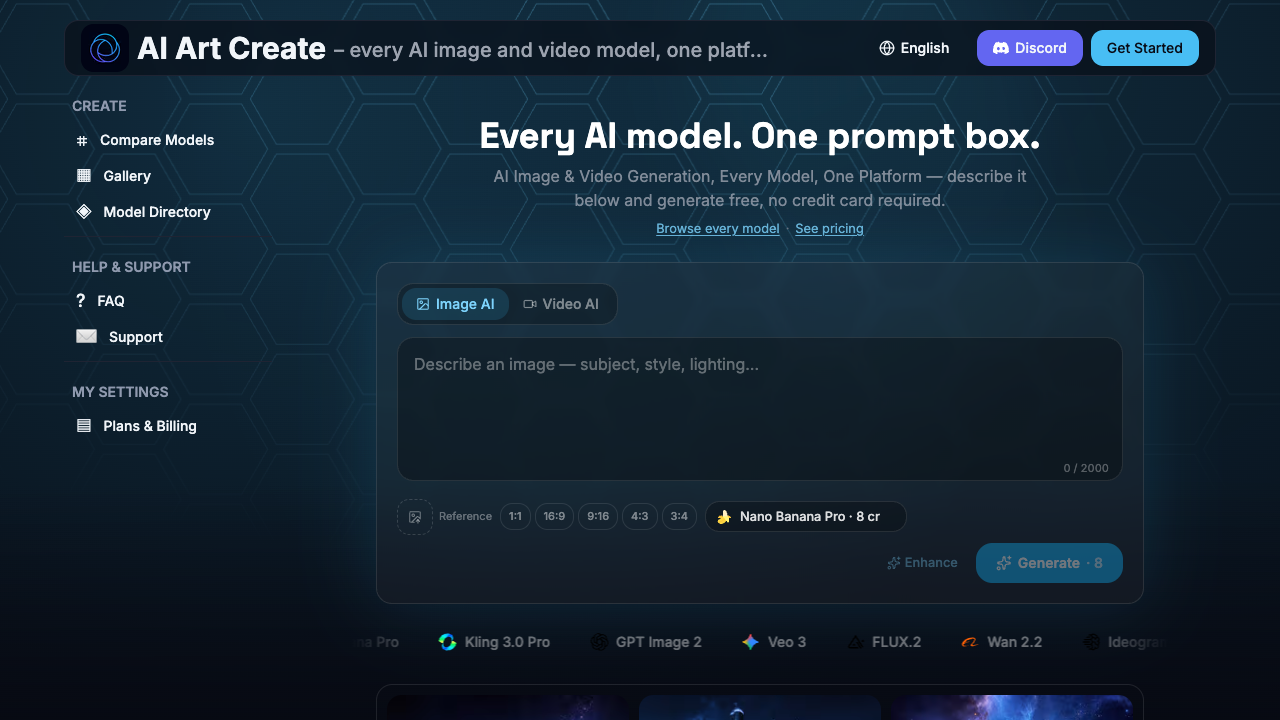
AI Art Create is an all-in-one image and video generation platform that aggregates multiple AI models into a single web-based interface. Instead of requiring users to maintain individual subscriptions for separate AI tools, the platform consolidates models such as Seedance, Kling, Veo, Nano Banana Pro, GPT Image, Flux, Ideogram, and Recraft behind a unified prompt interface and credit balance. Users can create high-resolution stills or motion clips seamlessly from text descriptions or reference images. The platform operates using a flexible credit system where credits are deducted per generation based on the compute requirements of the chosen model. A central feature is its side-by-side model comparison tool, which enables users to test a single prompt across several models simultaneously. This allows creators to evaluate visual outputs, artistic styles, and motion consistency before committing full credit amounts. Additionally, the platform provides prompt auto-enhancement, a personal gallery for saving past work, and a public gallery for discovering and remixing community prompts. AI Art Create is designed for digital marketers, content creators, social media managers, and visual designers who require varied AI assets across different creative projects. E-commerce brand owners can quickly produce product photography shots from text descriptions or reference images, while social media teams can generate vertical video clips for Instagram Reels and TikTok. The platform also caters to artists and agency teams looking for efficient ways to produce ad creatives, concept art, headshots, and logo concepts. What distinguishes AI Art Create from single-vendor tools like Midjourney or Runway is its multi-provider ecosystem and rapid model integration approach. Rather than locking users into one vendor's roadmap or pricing structure, the platform adds new image and video models as soon as they release. By bundling these models into a single subscription plan, it eliminates the need to manage separate accounts while offering priority rendering queues, commercial usage rights, and optional private generation settings.
Pros & cons
Pros
- Consolidates major models like Flux, Kling, Veo, and GPT Image into a single subscription.
- Includes a side-by-side comparison tool to test prompts across models before spending credits.
- Allows switching between image and video generation using the same credit balance.
- Offers same-day access to newly released AI models without additional account setups.
- Provides commercial usage rights on Creator and Studio subscription tiers.
Cons
- Credit allocation refreshes per billing cycle and requires top-ups if exhausted.
- Side-by-side prompt testing consumes credits for each model selected.
- Default generations are public unless subscribed to the Studio plan.
Use cases
- E-commerce store owners can generate catalog-ready product photography from written descriptions or reference images.
- Social media managers can convert still images or text descriptions into animated vertical clips for Reels, TikTok, and Shorts.
- Digital marketing agencies can run multi-model prompt tests to create on-brand image and video ad variations rapidly.
- Graphic designers can experiment with concept art, logo concepts, and anime visual styles across multiple AI models.
- Content creators can generate portrait headshots and storyboard sequences maintaining visual character consistency.
Features
- multi-model aggregation across leading image and video ai models
- priority generation queue for faster processing times
- personal and public gallery with community prompt remixing
- prompt auto-enhancement for output optimization
- image-to-video animation from still frames
- text-to-image and text-to-video generation capabilities
- side-by-side model comparison tool for testing prompts simultaneously
- unified prompt box and shared credit balance across all models
Pricing
Starter
$9.99 / month
- 1,000 credits every month
- Access to every model in the catalog
- Image and video generation
Creator
$24.99 / month
- 3,200 credits every month
- Access to every model in the catalog
- Image and video generation
- Side-by-side model comparison tool
- Priority queue for faster generation
- Commercial usage rights
Studio
$59.99 / month
- 9,000 credits every month
- Access to every model in the catalog
- Image and video generation
- Side-by-side model comparison tool
- Priority queue for faster generation
- Commercial usage rights
- Private generations by default
- Early access to new model releases
FAQs
What models are available on AI Art Create?
AI Art Create includes major image models like Nano Banana Pro, GPT Image, Flux, Ideogram, and Recraft, alongside video models such as Seedance, Kling, Veo, Wan 2.2, LTX Video, and PixVerse v5.
How does the side-by-side comparison tool work?
The tool allows you to enter a single prompt and run it simultaneously across multiple selected AI models. The generated outputs are displayed side by side so you can evaluate visual styles and quality before spending extra credits.
Can I try AI Art Create for free before purchasing a plan?
Yes, you can test both text-to-image and text-to-video tools with an initial free generation without providing credit card details. Continued creation requires credits from a paid plan or top-up pack.
How do credits work across different models?
Credits are spent per generation and apply to both image and video creation. Credit costs vary depending on the specific model used, as compute-intensive video models consume more credits than basic image models.
Are my generated images and videos private?
Generations are private by default on the Studio plan and for personal gallery storage. Users can voluntarily share their work to the public gallery where others can view and remix prompts.
What is the difference between Starter, Creator, and Studio plans?
Starter ($9.99/mo) provides 1,000 credits for basic generation. Creator ($24.99/mo) offers 3,200 credits, side-by-side comparison, priority queueing, and commercial usage rights. Studio ($59.99/mo) adds 9,000 credits, default private generations, and early access to new models.
Ratings & reviews
No reviews yet. Be the first to share how AI Art Create worked for you.
Alternatives to AI Art Create

Create realistic face swaps in photos, videos, and GIFs instantly with online AI generation tools built for creators, marketers, and meme makers.

Integrate over 1,000 AI models into your apps with a single API for image, video, voice, and 3D generation without the need for expensive GPU maintenance.

Transform text, images, and videos into high-quality anime or artistic animations with over 30 unique styles for content creators and digital filmmakers.
Sponsored tools

Test your knowledge in live multiplayer Jeopardy-style trivia battles with AI-assisted grading that recognizes correct answers even with spelling mistakes.

Connect with engaged niche audiences or monetize your subscriber base through an automated marketplace featuring verified metrics and secure Stripe payments.

Monitor brand citations and prompt visibility across Google AI Overviews, ChatGPT, Perplexity, Claude, and Gemini with free 30-day answer engine reports.

Generate cinematic videos with synchronized audio and multi-modal references. Empower creators and marketers to direct consistent characters, action, and sound.

Create 2K AI videos with native stereo audio from text or images. Ideal for creators and marketers seeking rapid, studio-grade visual content production.

Generate marketing videos, AI avatars, and multi-language translations from prompts, images, or product links without any filming or manual editing.

Detect and strip hidden AI Unicode markers and rewrite sentences to eliminate statistical ChatGPT watermarks for writers, students, and content creators.