

Unblur Image Online Free
Click to visit website
About
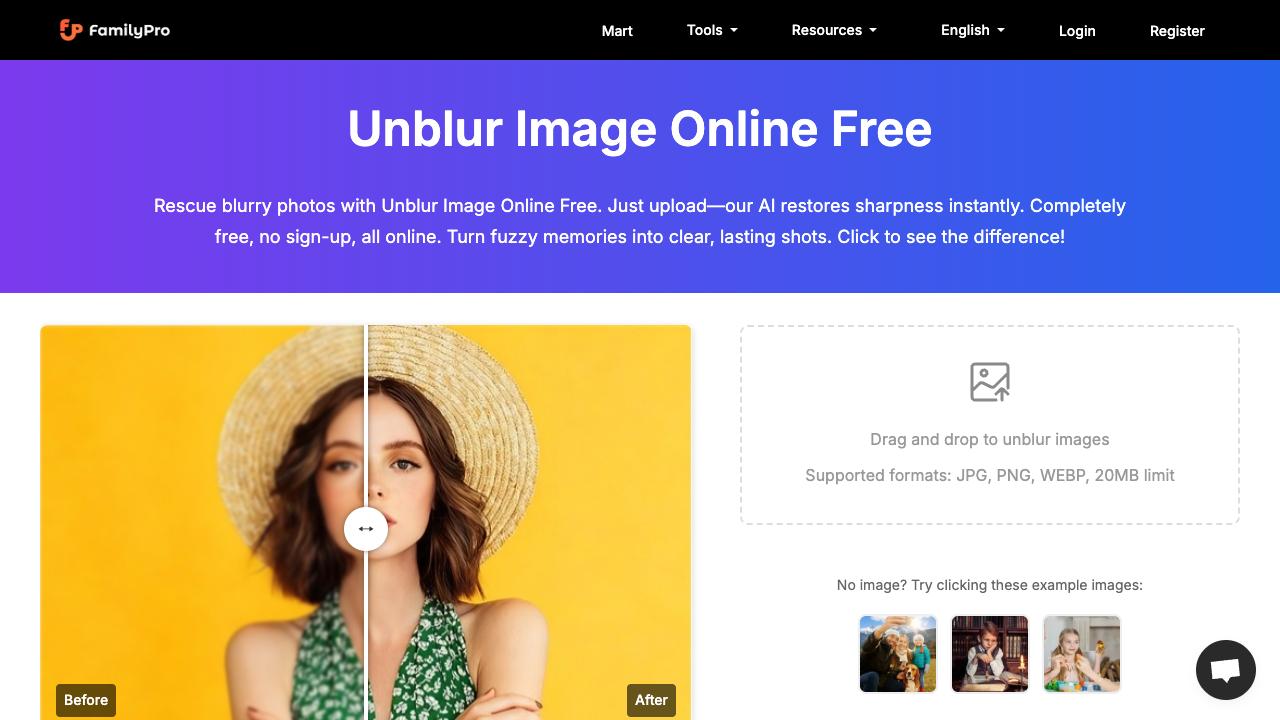
Unblur Image Online Free is a specialized AI-driven utility designed to salvage photographs affected by motion blur, camera shake, or poor focus. By utilizing advanced machine learning algorithms, the tool identifies pixelated or fuzzy areas and reconstructs the underlying details to produce a crisp, high-definition result. It serves as a browser-based alternative to complex photo editing software, allowing users to improve image quality without any manual retouching or technical expertise. The tool works through a simple three-step automated process. Users upload their images in JPG, PNG, or WEBP formats, provided the file size remains under 20MB. The AI engine then analyzes the visual data, sharpening edges and enhancing clarity while carefully preserving the original aesthetic and color balance of the shot. Once the transformation is complete—usually within a few seconds—the high-resolution version, supporting up to 4000x4000 pixels, is ready for immediate download and use in digital or print media. This tool is exceptionally well-suited for a variety of users, including social media influencers, eCommerce business owners, and amateur photographers. For influencers, it helps rescue candid shots or selfies taken in low-light conditions. Online sellers can use it to ensure product listings look professional and sharp, which can directly impact conversion rates. It is also a valuable resource for individuals looking to restore old family photographs that have faded or lost their focus over several decades. What distinguishes this platform from many other AI enhancers is its focus on user accessibility and privacy. It offers a no sign-up entry point, allowing for quick one-off edits without the friction of account creation. Furthermore, because it is an online tool, it doesn't require any system-heavy installations. The platform emphasizes secure processing and does not store user data or uploaded content, providing peace of mind for those handling sensitive personal or professional imagery.
Pros & Cons
Allows unblurring without creating an account for immediate results.
Supports high-resolution images up to 4000x4000 pixels.
Capable of sharpening blurred text in documents and books.
Preserves original image character while enhancing sharpness.
Compatible with modern web image formats including WEBP.
Initial usage is restricted to two free uses before requiring a sign-up.
Maximum file size is limited to 20MB per upload.
Does not support RAW file formats directly.
Requires a stable internet connection as an online-only tool.
Use Cases
eCommerce business owners can transform blurry product photos into crisp, professional images to improve store conversion rates.
Social media creators can quickly fix out-of-focus selfies or group shots before sharing them on platforms like Instagram.
Archivists and family historians can restore clarity to old, faded photographs to preserve memories for future generations.
Students can unblur low-quality photos of lecture slides or whiteboard notes to make the text legible for studying.
Graphic designers can sharpen compressed screenshots or low-resolution assets for use in web layouts or presentations.
Platform
Task
Features
• batch credit system for frequent users
• optimized for natural skin textures in portraits
• restores clarity to blurry text and documents
• secure in-browser data processing
• high-resolution support up to 4000x4000px
• no sign-up required for quick use
• support for jpg, png, and webp
• ai-powered auto-sharpening
FAQs
Is Unblur Image really free? Do I need to sign up?
Yes, the platform offers free uses without a mandatory sign-up. New users can receive 40 free credits upon registration and are eligible for up to 60 free credits per day for ongoing projects.
What image formats and sizes are supported?
The tool handles popular formats including JPG, PNG, and WEBP. It supports high-resolution images up to 4000x4000 pixels with a file size limit of 20MB.
How does the AI restoration work?
The AI intelligently analyzes blurry areas caused by motion or poor focus and reconstructs lost details. It is designed to sharpen edges while keeping textures like skin and landscapes looking natural.
Is my uploaded image data safe?
Images are processed securely through your web browser. The service provider states that they do not store your photos or personal information after the processing is complete.
Pricing Plans
Free Tier
Free Plan• No sign-up required for basic use
• 2 initial free uses
• 60 daily credits with sign-up
• Support for JPG, PNG, and WEBP
• Maximum 20MB file size
• High-resolution support up to 4000px
• Automatic AI sharpening
Job Opportunities
There are currently no job postings for this AI tool.
Ratings & Reviews
No ratings available yet. Be the first to rate this tool!
Featured Tools

adly.news
Connect with engaged niche audiences or monetize your subscriber base through an automated marketplace featuring verified metrics and secure Stripe payments.
View Details
Reztune
Land more interviews by instantly tailoring your resume to any job description using AI-driven keyword optimization and professional, ATS-friendly templates.
View Details
Image to Image AI
Transform photos and videos using advanced AI models for face swapping, restoration, and style transfer. Perfect for creators needing fast, professional visuals.
View Details
Nano Banana
Edit and enhance photos using natural language prompts while maintaining character consistency and scene structure for professional marketing and digital art.
View Details
Nana Banana Pro
Maintain perfect character consistency across diverse scenes and styles with advanced AI-powered image editing for creators, marketers, and storytellers.
View Details
Kling 4.0
Transform text and images into cinematic 1080p videos with multi-shot storytelling, character consistency, and native lip-synced audio for professional creators.
View Details
AI Seedance
Generate 15-second cinematic 2K videos with physics-based audio and multi-shot narratives from text or images. Ideal for creators and marketing teams.
View Details
Mistrezz.AI
Engage in immersive NSFW roleplay and ASMR voice sessions with adaptive AI companions designed for structured escalation, fantasy scenarios, and personal connection.
View Details
Seedance 3.0
Transform text prompts or static images into professional 1080p cinematic videos. Perfect for creators and marketers seeking high-quality, physics-aware AI motion.
View Details
Seedance 3.0
Transform text descriptions into cinematic 4K videos instantly with ByteDance's advanced AI, offering professional-grade visuals for creators and marketing teams.
View Details
Seedance 2.0
Generate broadcast-quality 4K videos from simple text prompts with precise text rendering, high-fidelity visuals, and batch processing for content creators.
View Details