

Test your knowledge in live multiplayer Jeopardy-style trivia battles with AI-assisted grading that recognizes correct answers even with spelling mistakes.

C2PA Remover
Inspect and remove C2PA content credentials, EXIF, and provenance data from images, videos, and documents without altering pixel quality.
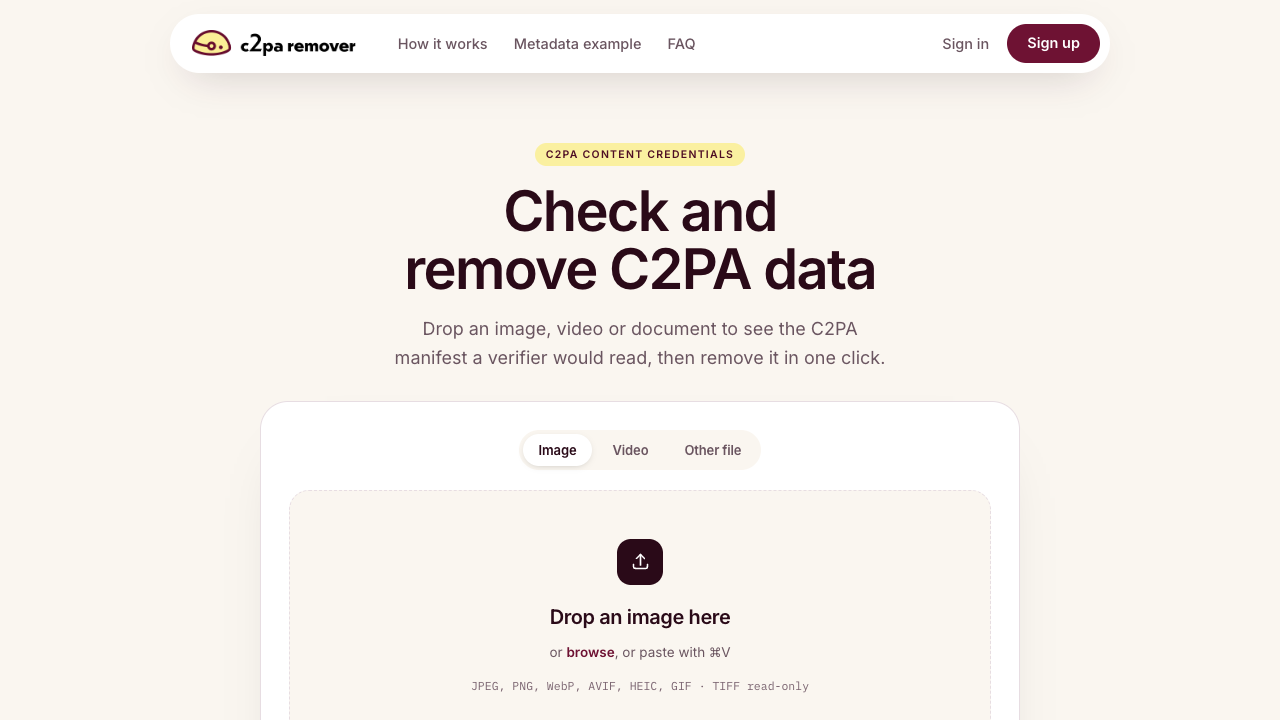
About C2PA Remover
C2PA Remover is an online metadata utility designed to inspect and eliminate C2PA Content Credentials, provenance history, and embedded metadata from digital media. As modern camera hardware, graphic design suites, and generative AI models attach tracking manifests into exported files, this tool allows users to view the exact manifest read by verifiers and delete it with a single click. The tool operates directly in the browser with drag-and-drop and clipboard paste support, making metadata verification and cleanup immediate. The platform features specialized metadata removal methods tailored to different media types to ensure file integrity. For raster graphics such as JPEG, PNG, WebP, AVIF, HEIC, and GIF files, the manifest, EXIF, and XMP data are spliced out while every other byte is copied unchanged. For video files including MP4, MOV, and M4V, the manifest box is neutralized in place so the underlying video stream remains unaltered without re-encoding. It also supports document and audio formats like PDF, MP3, SVG, DOCX, and ODT by stripping provenance and document properties. This utility is suited for commercial photographers, video creators, marketing agencies, and freelancers who need to maintain privacy or protect their production workflows. It helps creators prevent platforms like TikTok, YouTube, LinkedIn, and Meta from automatically applying inaccurate AI-generated badges to files that only utilized minor AI-assisted filters. It also allows agencies to deliver clean assets to clients without exposing internal version histories, device identifiers, or timestamps. Unlike conventional re-encoding tools that alter file compression and degrade visual quality, C2PA Remover guarantees lossless handling where pixels and streams are left completely untouched.
C2PA Remover pros & cons
Pros
- Removes C2PA manifests and metadata without re-encoding or degrading media quality.
- Supports a wide selection of file types across images, video formats, and documents.
- Requires no mandatory account creation or sign-in to inspect and clean files.
- Prevents social media platforms from applying false AI-generated labels to edited work.
Cons
- TIFF format support is currently restricted to read-only inspection.
- Does not include automated batch processing capabilities on the main interface.
C2PA Remover use cases
- Commercial photographers can scrub device identifiers, timestamps, and tool versions before sending deliverables to clients.
- Video creators can prevent social media platforms from automatically tagging lightly edited footage with AI-generated labels.
- Creative agencies can inspect incoming files to audit the full C2PA manifest provenance chain before publishing.
- Privacy-conscious professionals can strip document properties and tracking data from PDFs, SVG graphics, and audio files.
C2PA Remover features
- c2pa manifest reader and inspector
- privacy-first architecture with no file storage or required sign-in
- browser drag-and-drop and clipboard paste upload functionality
- document and audio provenance scrubbing for pdf, mp3, svg, docx, and odt
- in-place video manifest box neutralization for mp4, mov, and m4v
- broad image support including jpeg, png, webp, avif, heic, and gif
- lossless byte processing with untouched pixels and video streams
- one-click c2pa, exif, and xmp metadata removal
C2PA Remover pricing
Is C2PA Remover free? Yes, C2PA Remover has a free plan.
Free
Free
- Inspect C2PA manifests in images, videos, and documents
- One-click C2PA metadata removal
- Lossless byte copying with untouched pixels
- Support for JPEG, PNG, WebP, AVIF, HEIC, GIF, MP4, MOV, and docs
- No sign-in required and files are never stored
C2PA Remover FAQs
What is C2PA in simple terms?
It is an open standard that lets a file carry a cryptographically signed record of how it was made and edited, allowing verifiers and platforms to inspect its provenance history.
Does removing C2PA content credentials degrade file quality?
No. The tool splices out C2PA, EXIF, and XMP metadata or neutralizes manifest boxes in place, copying image bytes and video streams unchanged without re-encoding.
What media formats are supported by C2PA Remover?
Supported formats include JPEG, PNG, WebP, AVIF, HEIC, and GIF images (with TIFF read-only), MP4, MOV, and M4V videos, along with PDF, MP3, SVG, DOCX, and ODT files.
Why do creators choose to remove C2PA metadata?
Creators remove credentials to protect private device details, omit tool history from client deliverables, and prevent platforms from mislabeling edited files as AI-generated.
Are uploaded files stored on the server?
No. Files are never stored on the platform servers, and the tool can be used directly without creating an account or signing in.
Ratings & reviews
No reviews yet. Be the first to share how C2PA Remover worked for you.
Sponsored tools

Connect with engaged niche audiences or monetize your subscriber base through an automated marketplace featuring verified metrics and secure Stripe payments.

Track brand citations and mentions across Google AI Mode, ChatGPT, Claude, and more. Discover top-cited sources and queries with zero signup required.

Monitor brand citations and prompt visibility across Google AI Overviews, ChatGPT, Perplexity, Claude, and Gemini with free 30-day answer engine reports.
Generate cinematic videos with synchronized audio and multi-modal references. Empower creators and marketers to direct consistent characters, action, and sound.

Create 2K AI videos with native stereo audio from text or images. Ideal for creators and marketers seeking rapid, studio-grade visual content production.