
Compose unique musical tracks from text or lyrics using advanced AI models, offering royalty-free commercial licenses for content creators and professionals.

MakeSong
Create professional, royalty-free songs and music videos in seconds using AI-powered text-to-music tools designed for creators, musicians, and marketers.
Starting at
$19.90/mo
About MakeSong
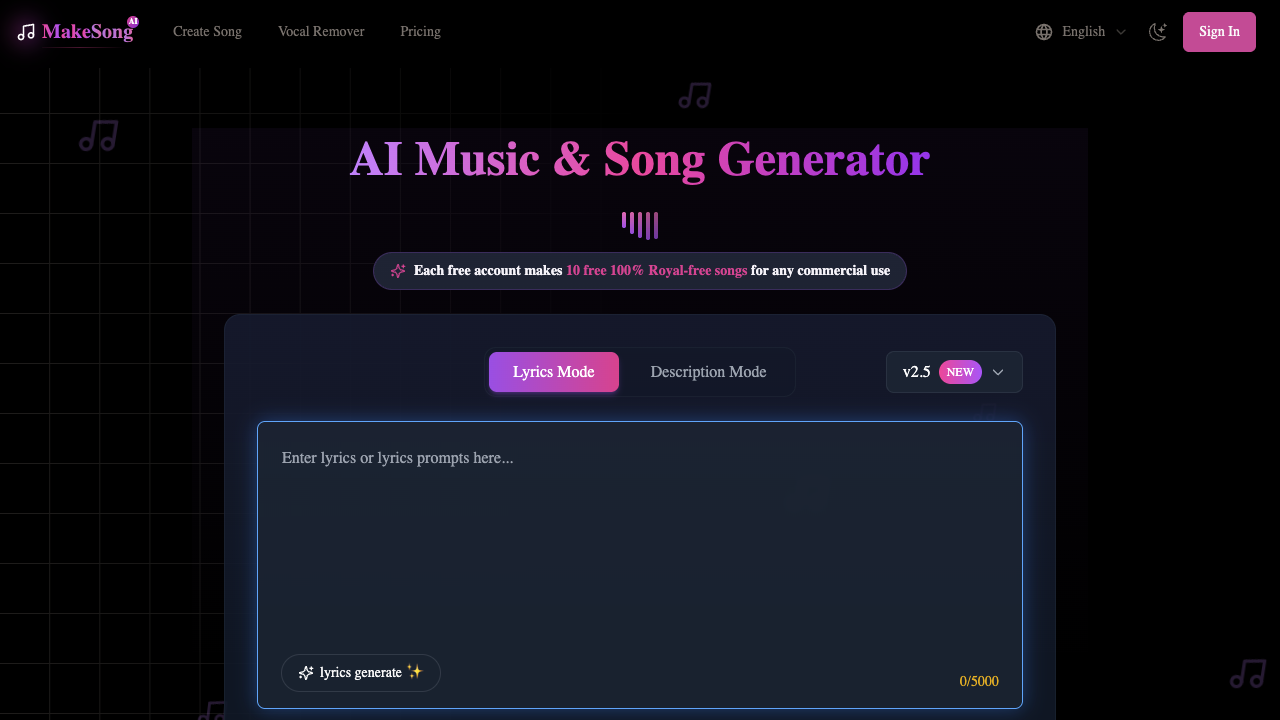
MakeSong is a comprehensive AI-driven platform designed to transform text prompts and lyrics into fully realized musical compositions and accompanying videos. Utilizing advanced AI models such as v2.5 and v3, the tool allows users to generate high-quality audio across a vast spectrum of genres, from K-Pop and Hip-Hop to Classical and Country. The primary purpose of the platform is to democratize music production, enabling individuals without formal training to create professional-sounding tracks that include both instrumental arrangements and realistic human-like vocals. The workflow is straightforward yet flexible, offering two main modes: Lyric-to-Music and Prompt-to-Music. Users can input their own lyrics, using tags like [chorus] to guide the song structure, or simply describe a mood and style to let the AI compose from scratch. Beyond basic generation, the suite provides a robust set of editing and utility tools, including a vocal remover, an acapella extractor, and a stem splitter. It also features a unique AI music video generator and "Singing Photo" tool, which allows creators to pair their audio with synchronized visuals for social media or marketing content. This platform is ideal for independent musicians, content creators, and small businesses. Musicians can use it to prototype demos or generate backing tracks, while YouTubers and social media influencers can produce royalty-free music tailored to their video's emotional arc. It is also a valuable resource for game developers needing atmospheric soundtracks and advertisers looking for custom jingles. The ability to export in lossless MP3 or WAV formats ensures that the output is ready for professional use in various digital media projects. What distinguishes MakeSong from other AI music generators is its integrated ecosystem of audio and video tools. While many competitors focus strictly on melody generation, MakeSong provides a complete creative pipeline that includes lyrics generation, vocal processing, and video synchronization. Furthermore, the platform’s emphasis on commercial viability—offering clear commercial licenses and royalty-free rights for paid subscribers—makes it a practical choice for professional environments where copyright compliance is a critical requirement.
MakeSong pros & cons
Pros
- Supports 100% royalty-free commercial use with a downloadable license.
- Includes integrated AI music video and singing photo generators.
- Provides advanced editing features like 'Replace Section' and 'Extend Song'.
- Offers a comprehensive suite of tools including stem splitting and vocal removal.
- Supports a diverse range of musical styles from K-Pop to Classical.
Cons
- Credit-based system limits the number of songs that can be generated per month.
- Cloud storage is restricted to 365 days for Starter and Standard users.
- The 20% discount is only available for users who commit to yearly billing.
- The interface might be overwhelming due to the large number of sub-tools.
MakeSong use cases
- Independent musicians can generate high-quality backing tracks and vocal demos to refine their song ideas across various genres.
- YouTube content creators can produce unique background music and synchronized AI music videos to increase engagement without copyright risks.
- Game developers can create custom soundtracks tailored to specific game atmospheres and plots to enhance player immersion.
- Advertisers can craft catchy commercial jingles and short songs by inputting specific brand descriptions and preferred musical styles.
- Podcast producers can generate tailored intro music and sound effects to match the specific tone and genre of their audio dramas.
MakeSong features
- ai music video generator
- text-to-music generation
- lyric-to-song conversion
- extend and cover song functionality
- mp3 and wav lossless downloads
- multi-language vocal support
- acapella extractor
- vocal remover and stem splitter
MakeSong pricing
Is MakeSong free? No, MakeSong doesn't offer a free plan; pricing starts at $19.90 / month.
Starter
$19.90 / month
- 150 Credits / Month
- Advanced models (v3, v2.5)
- AI Music Video Generator
- AI Image Generator
- Download mp3/wav lossless
- Private Generations
- Commercial Use License
- Vocal Remover
- 365-day song storage
Standard
$29.90 / month
- 1000 Credits / Month
- Priority generation queue
- 2 running jobs at once
- AI Music Video Generator
- Download mp3/wav lossless
- Private Generations
- Commercial Use License
- 365-day cloud storage
- Vocal Remover
Premium
$49.90 / month
- 4000 Credits / Month
- Priority generation queue
- 4 running jobs at once
- Unlimited cloud storage
- AI Music Video Generator
- Download mp3/wav lossless
- Private Generations
- Commercial Use License
- Vocal Remover
MakeSong FAQs
Are the AI-generated songs available for commercial use?
Yes, songs generated on paid plans are royalty-free and include a commercial use license. Users can download a commercial license certificate to verify their rights for use in ads or social media.
What languages does the song generator support?
The platform supports a wide variety of languages for vocal generation, including English, Brazilian, Japanese, and Russian. This allows users to create music that caters to global audiences.
How long does it take to generate a song?
The AI is capable of generating high-quality music in just a few seconds. Users with Standard or Premium plans benefit from a priority generation queue for even faster processing.
Can I separate vocals from the background music?
Yes, the tool includes a Vocal Remover and an AI Stem Splitter feature. These tools allow users to isolate vocals or individual instrument tracks from their generated or uploaded songs.
Ratings & reviews
No reviews yet. Be the first to share how MakeSong worked for you.
Alternatives to MakeSong
View all alternatives
Generate high-quality, royalty-free songs in minutes using AI. Transform lyrics or text into professional tracks with custom vocals for videos, ads, and more.

Create studio-quality songs from text prompts or lyrics in 30 seconds with this AI generator, offering royalty-free tracks for creators and game developers.

Create original, royalty-free tracks in minutes using advanced AI to power your videos, podcasts, or games without needing any formal musical composition skills.

Generate custom, high-quality music tracks from text descriptions or melodic audio prompts using Meta's single-stage transformer language model.

Create, customize, and distribute unique royalty-free music in seconds for digital projects using ethical AI tools designed for creators and filmmakers.

Transform human emotions and sentiments into unique musical experiences with AI-driven sound generation tailored for creators seeking personalized, mood-based audio.
Create full-length, royalty-free songs and custom AI covers in minutes with prompt-to-song generation, stem splitting, and diverse vocal cloning models.

Create high-quality, royalty-free music tracks, SFX, and MIDI stems using simple text prompts to streamline audio production for creators and musicians.
Sponsored tools

Test your knowledge in live multiplayer Jeopardy-style trivia battles with AI-assisted grading that recognizes correct answers even with spelling mistakes.

Connect with engaged niche audiences or monetize your subscriber base through an automated marketplace featuring verified metrics and secure Stripe payments.

Swap characters, backgrounds, or styles in any video while preserving original motion and camera paths. Perfect for digital marketers and creators.

Track brand citations and mentions across Google AI Mode, ChatGPT, Claude, and more. Discover top-cited sources and queries with zero signup required.