
Automate sales, support, and operations by deploying production-ready AI agents for voice, chat, and email without requiring dedicated engineering bandwidth.

Rork
Create native iOS and Android apps by chatting with AI. Turn app ideas into functional prototypes in minutes and production-ready products in just a few hours.
Free plan available
$25/mo
About Rork
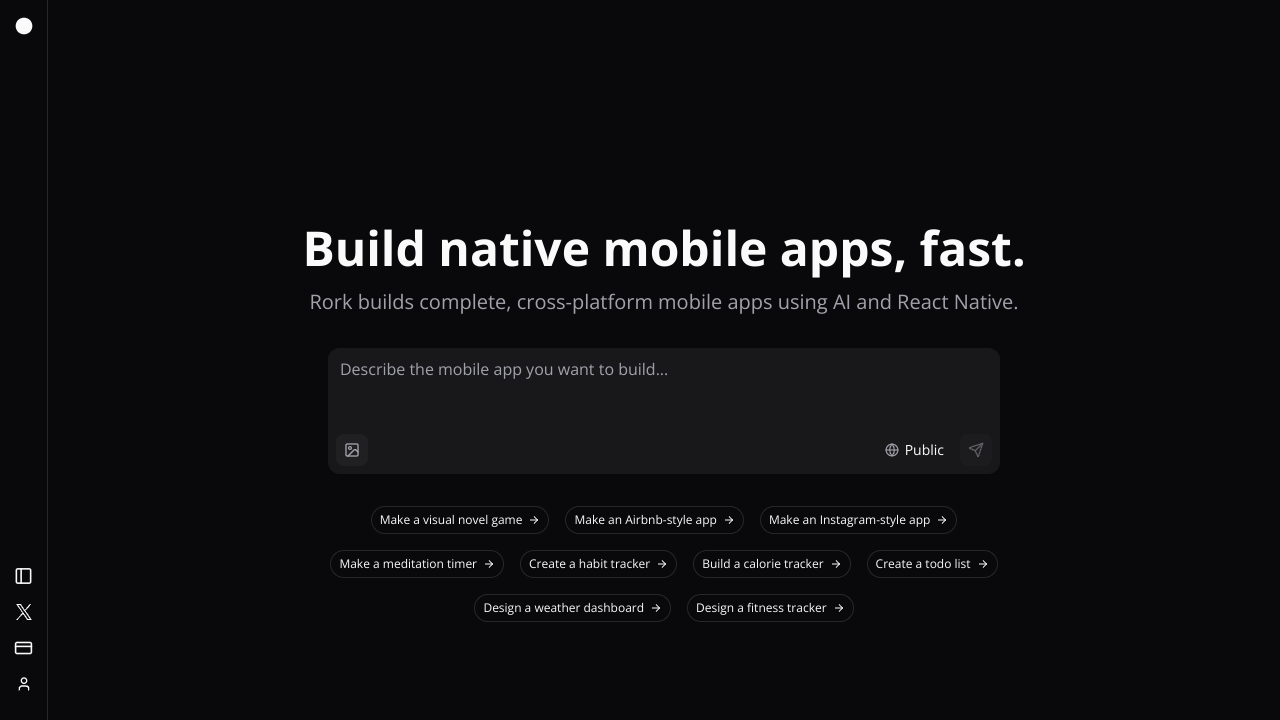
Rork is an AI-driven development platform designed to simplify the creation of native mobile applications through natural language processing. By allowing users to describe their app ideas in plain English, the tool generates functional code using the React Native and Expo frameworks. Unlike standard no-code builders that often produce limited web-based wrappers, Rork creates fully native code that can be tested instantly on physical devices through QR codes or via a browser preview. This approach bridges the gap between conceptualization and functional prototyping, enabling rapid iteration without traditional coding hurdles. The platform operates through a chat-based interface where users provide instructions to generate screens, logic, and integrations. A significant feature of the ecosystem is Rork Max, which extends capabilities to specialized environments such as Apple Watch, Vision Pro, Live Activities, and iPad widgets. For advanced users and professional workflows, Rork provides a two-way GitHub synchronization. This allows developers to export the generated code, make manual adjustments in external IDEs like Cursor, and sync those changes back to the Rork platform. It also includes hosted AI features for voice transcription and image generation, removing the need for users to manage their own API keys on paid plans. Rork is primarily targeted at founders, product managers, and non-technical entrepreneurs who need to move from an idea to a Minimum Viable Product (MVP) quickly. It is also suitable for solo developers who wish to accelerate the boilerplate phase of mobile development. While it excels at creating user interfaces and basic logic, it is positioned as a collaborative tool where complex integrations—such as custom social authentication, push notifications, or intricate payment systems—may eventually require engineering oversight or manual configuration using the exported code. What differentiates Rork from similar AI builders is its reliance on a professional, industry-standard tech stack. Because it uses React Native—the same framework powering apps like Discord and Shopify—users are not restricted to a proprietary ecosystem. The inclusion of the "App Preview" feature allows for immediate distribution to stakeholders without waiting for App Store review cycles. This makes it a highly efficient tool for user testing, internal business applications, and rapid market validation.
Rork pros & cons
Pros
- Generates production-ready React Native code used by top-tier tech companies.
- Supports cross-platform development for both iOS and Android simultaneously.
- Provides two-way GitHub sync for seamless transitions between AI and manual coding.
- Includes a version restore feature to safely revert to previous stable iterations.
- Allows instant physical device testing without waiting for App Store approval.
Cons
- Complex features like social auth and push notifications require manual engineering help.
- Code export and GitHub integration are restricted to paid subscription tiers.
- Direct native publishing to Google Play is not yet available within the platform UI.
- Monthly credits cannot be topped up individually without upgrading to a higher plan.
Rork use cases
- Founders can rapidly build and iterate on MVPs to validate ideas with real users before hiring developers.
- Product Managers can create high-fidelity functional prototypes to demonstrate new features to internal stakeholders.
- Non-technical entrepreneurs can launch simple AI-powered utilities like chat or transcription apps without learning code.
- Solo developers can accelerate the initial UI and boilerplate phase of a React Native project using AI generation.
- Marketing teams can build internal tools or simple event apps that integrate with Google Sheets or Airtable.
Rork features
- multi-user collaboration
- two-way github synchronization
- natural language app generation
- version restore and preview
- hosted ai (openai) integrations
- app preview via qr code
- rork max (watch, vision pro, ipad support)
- react native and expo stack
Rork pricing
Is Rork free? Yes, Rork has a free plan, and paid plans start at $25 / month.
Free
Free
- App Preview testing
- Browser preview
- Basic AI generation
- Community support
- In-app local notifications
Paid Plans
$25 / month
- Full code export
- Two-way GitHub sync
- Hosted AI features
- Team collaboration
- App Store publishing
- Higher credit limits
Rork FAQs
How does Rork generate mobile apps?
Users describe their app idea in plain English, and Rork generates a working application using React Native and Expo. You can test the app instantly on your phone by scanning a QR code or viewing it in a browser preview.
Do I need coding experience to use Rork?
No coding experience is required to build a working prototype or a basic version 1 of an app. However, implementing complex features like custom authentication or native payments may eventually require engineering help or manual code editing.
Are the apps built with Rork fully native?
Yes, Rork builds fully native apps using React Native, the same framework used by major companies like Shopify and Discord. These apps work on both iOS and Android and can also be exported for web hosting.
Can I export my code to use elsewhere?
Yes, users on paid plans own all generated code and can export it via a GitHub integration. This allows you to continue development in tools like Cursor or host the app on platforms like Vercel and Netlify.
How can I add AI features like chat or voice transcription?
Rork has built-in integrations with OpenAI and hosts the AI for you on paid plans, meaning you don't need your own API keys. You simply ask the AI to build these features into your app through the chat interface.
Does Rork support Figma designs?
You can use Figma designs by copying your frames as images and pasting them into the Rork AI chat input. The platform can also process bulk exports of Figma screens via drag-and-drop to guide the UI generation.
Ratings & reviews
No reviews yet. Be the first to share how Rork worked for you.
Alternatives to Rork
View all alternatives
Build scalable mobile and web applications with a seasoned team of developers focused on ethical practices, fair pricing, and long-term technical support.

Build professional back-office applications faster using a Vue3 and Tailwind-based framework featuring built-in AI content generation and automated CRUD setup.

Optimize your creative and productivity workflows on Apple devices with a curated suite of native apps built for performance and seamless integration.

Empower your development team to build high-performance API portals with an open-source framework that combines OpenAPI schemas, MDX content, and live testing.

Scale mobile and web applications globally using proprietary data analytics and expert development services to reach millions of users across 160 countries.

Transform your digital ideas into market-ready apps, SaaS, and bots with a transparent software house specializing in rapid MVP development for entrepreneurs.

Launch a competitive taxi business using AI-assisted smart analytics and custom ride-share app development to streamline operations and attract more customers.

Accelerate digital transformation with a full-spectrum AI platform offering no-code app development, automated research analysis, and global data labeling services.
Sponsored tools

Test your knowledge in live multiplayer Jeopardy-style trivia battles with AI-assisted grading that recognizes correct answers even with spelling mistakes.

Connect with engaged niche audiences or monetize your subscriber base through an automated marketplace featuring verified metrics and secure Stripe payments.

Swap characters, backgrounds, or styles in any video while preserving original motion and camera paths. Perfect for digital marketers and creators.

Track brand citations and mentions across Google AI Mode, ChatGPT, Claude, and more. Discover top-cited sources and queries with zero signup required.